Video podcast studio setup: gear list and wiring diagram
Cameras, mics, lighting and signal flow for a two to four person video podcast, planned before you buy a single cable.
By John Barker • 6 October 2026
Podcasts are video shows now
Most podcasts are watched as well as listened to. That turns a couple of USB mics on a desk into a small TV studio: multiple cameras, lighting, a switcher and recording, all on top of great audio.
The good news is that a video podcast studio follows a very standard pattern. Plan it once and you can build it in an afternoon.
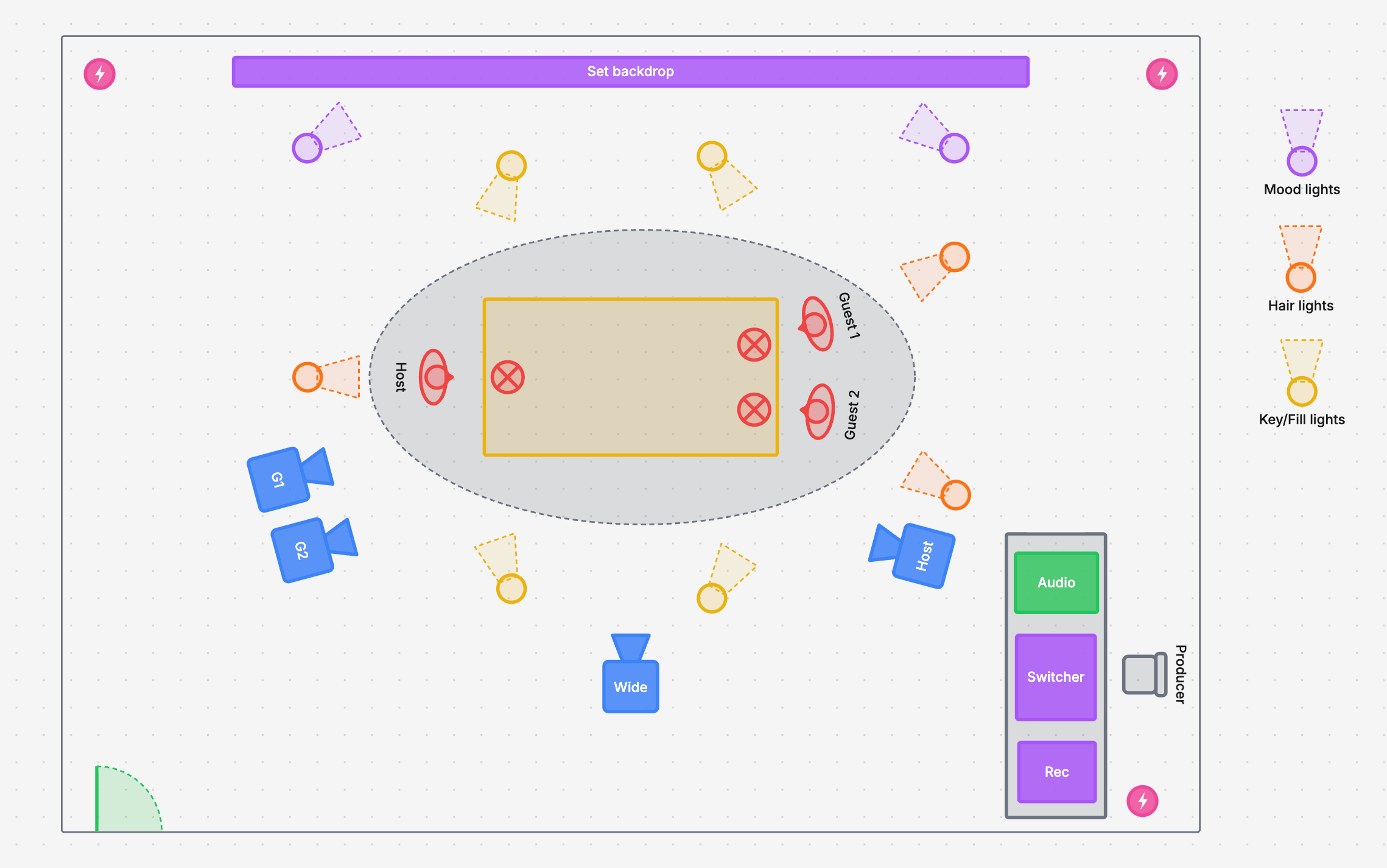
A three-person podcast studio laid out in H2R Gear, with cameras, lights, mics and the control desk
Start with the room layout
Before you buy anything, draw the room. The layout decides how many cameras you need, where the lights go and how long your cables are.
A classic three-person layout:
A table in the middle, with the host on one side and guests facing them.
A backdrop behind the guests, so the main shots have something interesting behind them.
One camera per person, positioned roughly opposite each speaker so they are looking near the lens when they talk to each other.
A wide camera that sees everyone, for intros, laughs and cross-talk.
A control desk off to the side with audio, the switcher and recording, and a seat for the producer.
The gear list
Audio (spend here first)
Viewers forgive an average picture. Nobody sticks around for bad audio.
Dynamic mics on boom arms, one per person. Dynamic mics reject room noise far better than condensers in an untreated room.
An audio interface or small mixer with enough mic preamps for every person, plus a spare.
Headphones for everyone, with a headphone amp if your interface does not have enough outputs.
Some acoustic treatment. Panels on the walls opposite the speakers, a rug and soft furnishings go a long way.
Cameras
One camera per person plus a wide. For three people that is four cameras.
Clean HDMI or SDI output and the ability to run all day without overheating.
Dummy batteries or mains power. Batteries will die halfway through an episode.
Switching and recording
A video switcher such as an ATEM Mini, or a computer running vMix or OBS with capture cards.
ISO recording if you want to re-edit later. Recording every camera separately gives your editor full control.
Audio into the switcher from the mixer, so the program recording has the final mix.
Lighting
Key and fill lights for each person, soft and from the front.
Hair or back lights to separate people from the background.
Practical or mood lights on the backdrop for colour and depth.
The signal flow
Write down how everything connects before you plug anything in:
Mics → audio interface or mixer. One XLR per mic.
Mixer → switcher. The main mix into the switcher’s audio input.
Mixer → headphones. So everyone hears themselves and each other.
Cameras → switcher. One HDMI or SDI per camera. Check your cable lengths: long HDMI runs need active cables or a switch to SDI. Our cable length calculator shows the limits for each type.
Switcher → recorder and monitor. Program out to a recorder or computer, and a multiview to a monitor for the producer.
Power. Count the outlets: cameras, lights, mixer, switcher, monitors and computers add up fast. The power consumption calculator tells you if one circuit is enough.
H2R Gear does both halves of the plan in one place:
The room: use the free drawing tools to draw the table, backdrop, people, cameras and lights. Rotate cameras and lights to face the set, and colour code light types.
The wiring: add your real mics, interface, cameras and switcher, and connect them with HDMI, SDI and XLR cables between the actual ports.
The kit list: the packlist builds itself from the plan, so you know exactly what to buy or bring.
On a paid plan you can share a read-only link with your co-host or editor. On any plan you can export the plan as a PDF to keep with the studio.
Studio setup checklist
Room drawn with camera and light positions
One mic and one camera per person, plus a wide
Every connection planned and cable lengths checked
Enough outlets and circuits for everything
A test recording reviewed on headphones and on a phone before the first episode