H2R Gear

Plan, diagram and pack your A/V gear like a pro

The complete AV planning tool for diagrams, packlists, patchlists, and cable management.

Free to start. Used by thousands of AV professionals worldwide.

How H2R Gear works

From idea to packed cases in three steps.

1

Build your gear

Grab items from the community library or build your own with the custom item builder. Add inputs, outputs, and labels to match your real equipment.

2

Diagram your setup

Place gear on a plan and draw cables between them. Use zones, labels, and cables to create a complete wiring diagram.

3

Pack, share, and go

Auto-generated packlists and patchlists keep you organised. Share plans with your team or export as PNG, JPG, or PDF.

Everything you need to make a plan

The app is packed full of features to make it much easier to plan for your next technical setup.

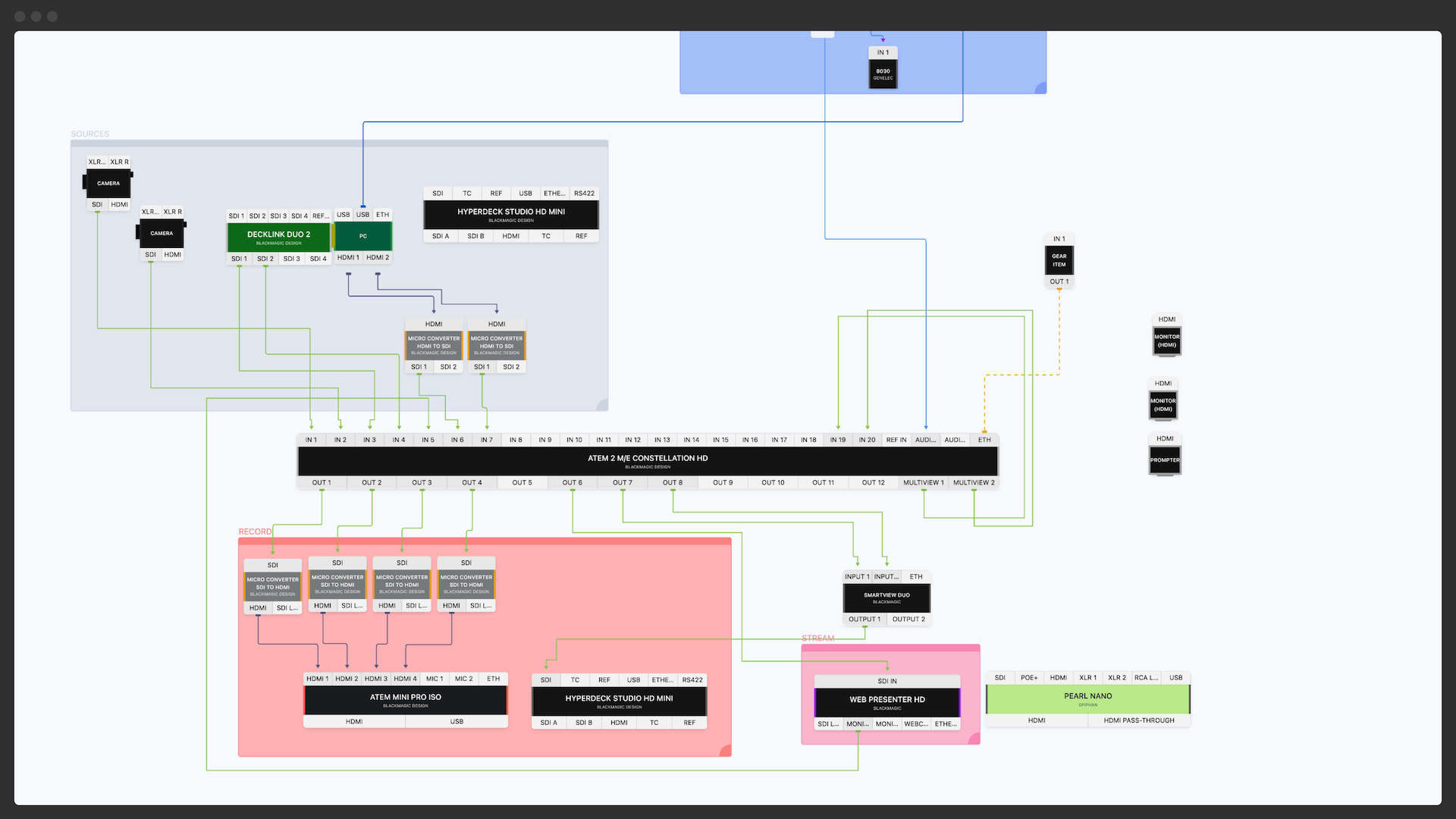
Draw cables between gear items and create a full wiring diagram of your equipment. Perfect for pre-visualising how it will all connect together.
See it in action

Explore a demo plan to see how diagrams, cables, packlists and sharing work together.

Ready to plan your next setup?

Create your free account and start building gear plans in minutes.

Sign up free

Built for your workflow

AV professionals, live streamers, remote teams and more use H2R Gear every day.

Packed with powerful features

Everything you need to plan, document, and execute technical setups of any size.

18+ cable types

HDMI, SDI, XLR, Dante, NDI, fiber and more. Label cables with IDs and lengths, and view a cable key for your whole plan.

Learn more about cables.

Zones

Mark off areas of your plan to represent rooms, stages, or racks. Colour-coded and labelled for instant readability.

Learn more about zones.

Plan sharing

Share a direct link to your plan with team members or your viewers. This will show up in read-only mode so they can explore it, but not mess it up!

Learn more about plan sharing.

Works for teams

Plan with your team from anywhere in the world, pick up where they left off, and get the ball rolling fast when new jobs come up.

Learn more about teams.

Export to PNG, JPG & PDF

Take your plans anywhere. Export high-quality images or PDFs for print, email, or client documentation.

Patchlists & CSV export

Document every signal connection in your setup. Track source and destination devices, then export a clean CSV for your records.

Learn more about patchlists.

Rich text labels

Add headings, lists, and formatted text directly on your plan for clear annotations and notes.

Learn more about text labels.

Custom item builder

Build any piece of gear with custom inputs, outputs, colours, and descriptive elements to match your real equipment.

Learn more about the builder.

Dark mode & themes

Work the way you prefer with light and dark modes for comfortable late-night planning sessions.

Even more built in

Power user features that make every planning session faster.

Undo & redo

Experiment freely knowing you can always step back.

Snap to grid

Keep plans neat and aligned automatically.

Multi-select & drag-and-drop

Move and reorder multiple items at once.

Keyboard shortcuts

Power through tasks with extensive shortcut support.

Zoom to fit & zoom to zone

Navigate large plans with precision zoom controls.

Left-to-right mode

Swap your plan orientation to match your signal flow.

Right-click context menus

Quick access to common actions on any element.

Internal Job & Gear IDs

Track assets with your own reference numbers.

Plan dates & filtering

Set rigging and event dates, then filter by upcoming or past.

Touch device support

Plan on the go with full tablet and touch support.

Cable key display

A colour-coded overview of every cable type in your plan.

Plans for every setup

Start free and upgrade as your needs grow.

Starter

Free

  • 2 active plans
  • Community gear library
  • Diagrams, packlists & builder
Get started free
Most popular

Pro

$15/mo

  • 100 active plans
  • Export to PNG, JPG & PDF
  • Patchlists, zones & sharing
Start with Pro

Team

$25/mo

  • 150+ active plans
  • All Pro features included
  • Collaborate with team members
Start with Team
View all pricing options

Trusted by A/V professionals worldwide

Join thousands of AV pros, streamers, and production teams who plan with H2R Gear.

Users
22k+
Items built
105k+
Plans created
68k+

Ready to get organised?

Start using H2R Gear to plan your next setup.

Get started

Frequently asked questions

What is a gear plan?
A H2R Gear plan is a collection of items, cables and labels that describe your audio/video setup and how everything connects together. It's a great way to plan and organise your equipment so that all your next production good as smoothly as possible.
Is there a free plan?
Yes! The free plan gives you access to core features including the diagram builder, community library, and a limited number of active plans. You can upgrade anytime to unlock more plans, export options, and team features.
Can I customise the look and feel of plans?
Yes, you can choose specific colours for all cable types - like HDMI, SDI, etc - so that you plan looks unique and makes sense to you. You can also use zones to mark off certain areas of your plans to be extra-readable.
What is plan sharing?
Send a plan link to friend or colleagues so they can explore your hard work. This is great for catching your team up on the latest gear you are using, or just to talk someone through a technical setup. Plan links are read-only, so no worries about anyone messing with your hard work.
Can I export my plans?
Absolutely. Pro and Team plans let you export your diagrams as PNG, JPG, or PDF files. You can also export patchlists as CSV files — perfect for sending to clients, printing for on-site reference, or keeping in your records.
Do I have to build all of my equipment?
Most likely not - The community library of gear is growing everyday, so the chances are that the gear item already exist in our system. Just grab it from the community library - make any changes you need - and use it on a plan.
How do Team subscriptions work?
A Team has an Admin and Members. When you start a Team subscription, you will be the admin of that team. From there you can add Team Members who can all see and edit plans shared to the team. An Admin or Team Member can share their personal plans with their Team.
I need some help!
Get in touch with the Help & Feedback link below and we'll do our best to point you in the right direction.