
New in H2R Gear v2.13
Draw the room around your gear with new shapes, symbols and a drawing toolbar.
Read more →New in H2R Gear v2.13
Draw the room around your gear with new shapes, symbols and a drawing toolbar.
Read more →Free AV Diagram Software
Draw professional AV wiring diagrams in your browser. Lay out video switchers, cameras, audio consoles and racks, then connect them with HDMI, SDI, XLR, Ethernet, fiber and 20 other cable types.
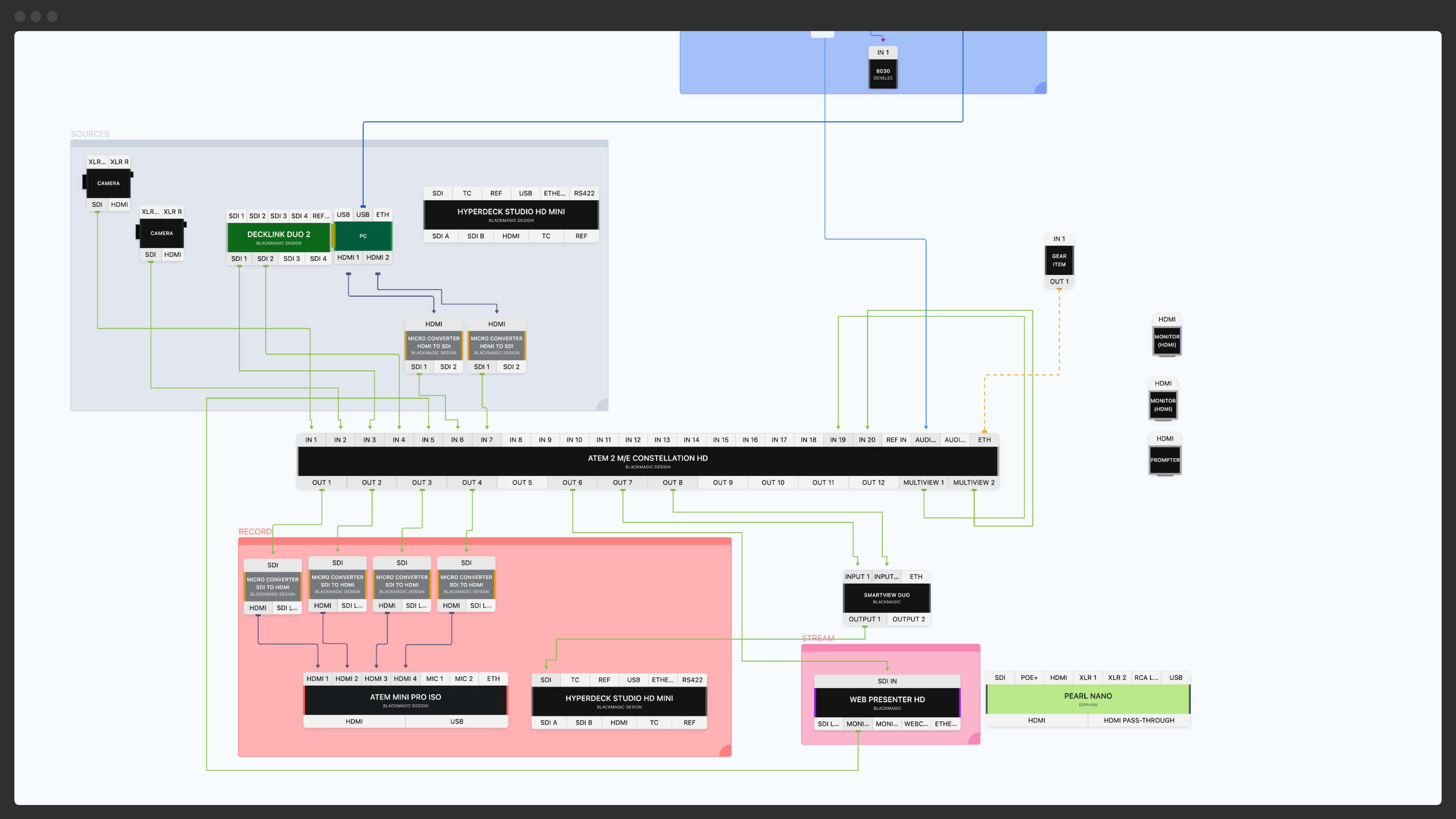
Search the community library for Blackmagic ATEMs, Yamaha consoles, PTZ cameras, Decimator converters and thousands of other items. No more rectangles labelled "Switcher".
Each item has accurate inputs and outputs. Cables only connect between compatible ports, so an SDI output will not quietly plug into an HDMI input without a converter in the chain.
Your diagram automatically produces a packlist, plus a patch list on Pro. Export everything to PDF, PNG or CSV for the rest of the crew.
1. Add your gear. Search the library for your exact equipment or build a custom item with the inputs and outputs you need. Drop items onto the canvas and move them around freely.
2. Connect with cables. Click a port, drag to another port, and a cable appears. Pick from 25+ cable types: HDMI, SDI, SMPTE, Triax, XLR, Jack, USB, Ethernet, EtherCon, DisplayPort, RCA, Speakon, DMX, fiber, PowerCon and more, plus five custom types you can name yourself. Each is colour-coded so the diagram stays readable.
3. Organise with zones. Mark off areas like the stage, control room, OB truck or rack location with labelled, colour-filled zones. Add text labels for crew notes.
4. Export and share. Generate a PDF or PNG of your diagram, a CSV patch list for production documentation, and a packlist for load-in day. Share a read-only link with your crew.

Plan festival stages, conference setups and concert rigs. Send the diagram to your riggers, sound engineers and lighting techs so everyone arrives knowing what's needed.
Diagram OB truck wiring, studio floor plans and multi-camera shoots. Patch lists export to CSV for production paperwork.
Document the permanent install so weekend volunteers can reference it. Plan weekly service signal flow without surprises.
Diagram boardrooms, conference rooms and presentation systems for clients. Keep a record of every install so you can replicate or troubleshoot later.
Ready to draw your first AV diagram?
Free account, no credit card. Start with a blank canvas or import an example.
An AV diagram (also called an AV wiring diagram, signal flow diagram, or AV schematic) is a visual map of an audio/video system. It shows every piece of gear, the cables between them and which inputs connect to which outputs. AV diagrams are essential for planning live events, designing installations, documenting broadcast setups and onboarding new crew members.
General-purpose diagram tools like Visio, Lucidchart and draw.io can technically draw an AV setup, but they have no knowledge of cables, connectors or AV gear. You end up redrawing the same Blackmagic ATEM shape over and over, manually colour-coding cable types and rebuilding patch lists in a spreadsheet. Purpose-built AV wiring diagram software handles all of that for you.
In practice, these terms get used interchangeably. A signal flow diagram tends to emphasise the path of audio or video through a system, an AV schematic often implies a more technical, installer-style drawing, and an AV wiring diagram is usually the working document used by the crew on site. H2R Gear handles all three.
H2R Gear is free to sign up. Build diagrams and generate packlists without spending anything. Pro adds share links, PDF, PNG and JPG export, zones, patch lists, projects and Left to Right mode, and Team adds shared plans, gear and projects for your crew. Need it for one job? The 30-Day Pass unlocks every Pro feature for a one-time $19.
Ready to get organised?
Start using H2R Gear to plan your next setup.
Get H2R Gear product updates
New features, templates and tips, straight to your inbox.
No spam. Unsubscribe any time.